Valve has announced Steam Families, a revamped program that allows players to create a group to share and play games with close family members. The program launches today in the Steam Beta Client and it replaces the Steam Family Sharing and Steam Family View features.
Steam Families can have up to six members, and joining gives you access to any sharable games in each member’s library. “Sharable games” is an important distinction, as Family Sharing is a feature that any developer can choose to opt out of for any reason at any time. Some games are also ineligible for sharing due to technical reasons.
Noteworthy games currently eligible for Family Sharing include Helldivers 2, Baldur’s Gate 3, Balatro, Cyberpunk 2077, Elden Ring, and Hogwarts Legacy. You can read the full list here.
While playing a game that a family member owns, you will create your own save files, earn your own achievements, and have access to workshop files, among other features. When you purchase a game, it still remains in your ownership and only appears in your own library.
Two members cannot play one copy of a game at the same time. For example, if two members want to play co-op using Member 1’s copy of Helldivers 2, Member 2 will either have to buy their own copy or play another copy owned by a different member in the family.
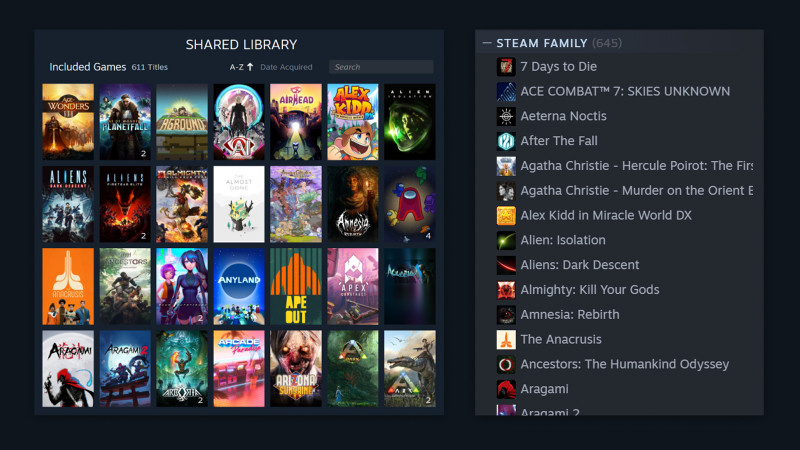
Steam has released an FAQ that answers some burning questions about Steam Families, including parental controls and how to manage child purchases. We recommend reading the full post for all the finer details, but here are some of the biggest takeaways:
- Members can leave a Steam Family at any time. However, that person will have to wait one year before creating or joining a new family. Additionally, vacant family slots cannot be filled for one year. Family Members can also kick out other members of the family.
- Children in a Steam Family cannot leave on their own and must be removed by an adult in the family.
- Shared family games can be played offline.
- Playing a member’s game also provides access to any sharable DLC they own.
- You can change which Steam Family member’s copy of a game you play, though if one has different DLC than the other, your save may not work.
- With the exception of Child members, you cannot restrict Family members from playing a game you own.
- If a family member gets banned for cheating while playing your copy of a game, you will also be banned in that game.
As previously mentioned, some games are ineligible for Family Sharing due to technical reasons. These include:
- Games that require an additional third-party key, account, or a subscription in order to play
- Free-to-play games and any purchased DLC for those games
- Free DLC for a game
- Games or DLC that is restricted in your or the borrower’s region
- Games that do not support the borrower’s operating system
- Games that the publisher has marked explicitly as unavailable for sharing
- Games marked as private by the original owner
- Games that are currently excluded from Family Sharing will continue to be excluded from sharing in Steam Families. This includes games that require an additional third-party account or subscription.
To create a Steam Family, you’ll need to opt into the Steam Family Beta. Click on Steam in the upper left, then choose the “Settings” menu. Select “Interface”, then under “Client Beta Participation”, select Steam Family Beta from the dropdown menu. You’ll then have to restart Steam to complete the process.
What do you think of Steam Families, and do you plan to make one? Let us know in the comments!
Commercials Cooperation Advertisements:
(1) IT Teacher IT Freelance

立刻註冊及報名電腦補習課程吧!
电子计算机 -教育 -IT 電腦班” ( IT電腦補習 ) 提供一個方便的电子计算机 教育平台, 為大家配對信息技术, 電腦 老師, IT freelance 和 programming expert. 讓大家方便地就能找到合適的電腦補習, 電腦班, 家教, 私人老師.
We are a education and information platform which you can find a IT private tutorial teacher or freelance.
Also we provide different information about information technology, Computer, programming, mobile, Android, apple, game, movie, anime, animation…
(2) ITSec

www.ITSeceu.uk
Secure Your Computers from Cyber Threats and mitigate risks with professional services to defend Hackers.
ITSec provide IT Security and Compliance Services, including IT Compliance Services, Risk Assessment, IT Audit, Security Assessment and Audit, ISO 27001 Consulting and Certification, GDPR Compliance Services, Privacy Impact Assessment (PIA), Penetration test, Ethical Hacking, Vulnerabilities scan, IT Consulting, Data Privacy Consulting, Data Protection Services, Information Security Consulting, Cyber Security Consulting, Network Security Audit, Security Awareness Training.
Contact us right away.
Email (Prefer using email to contact us):
SalesExecutive@ITSec.vip